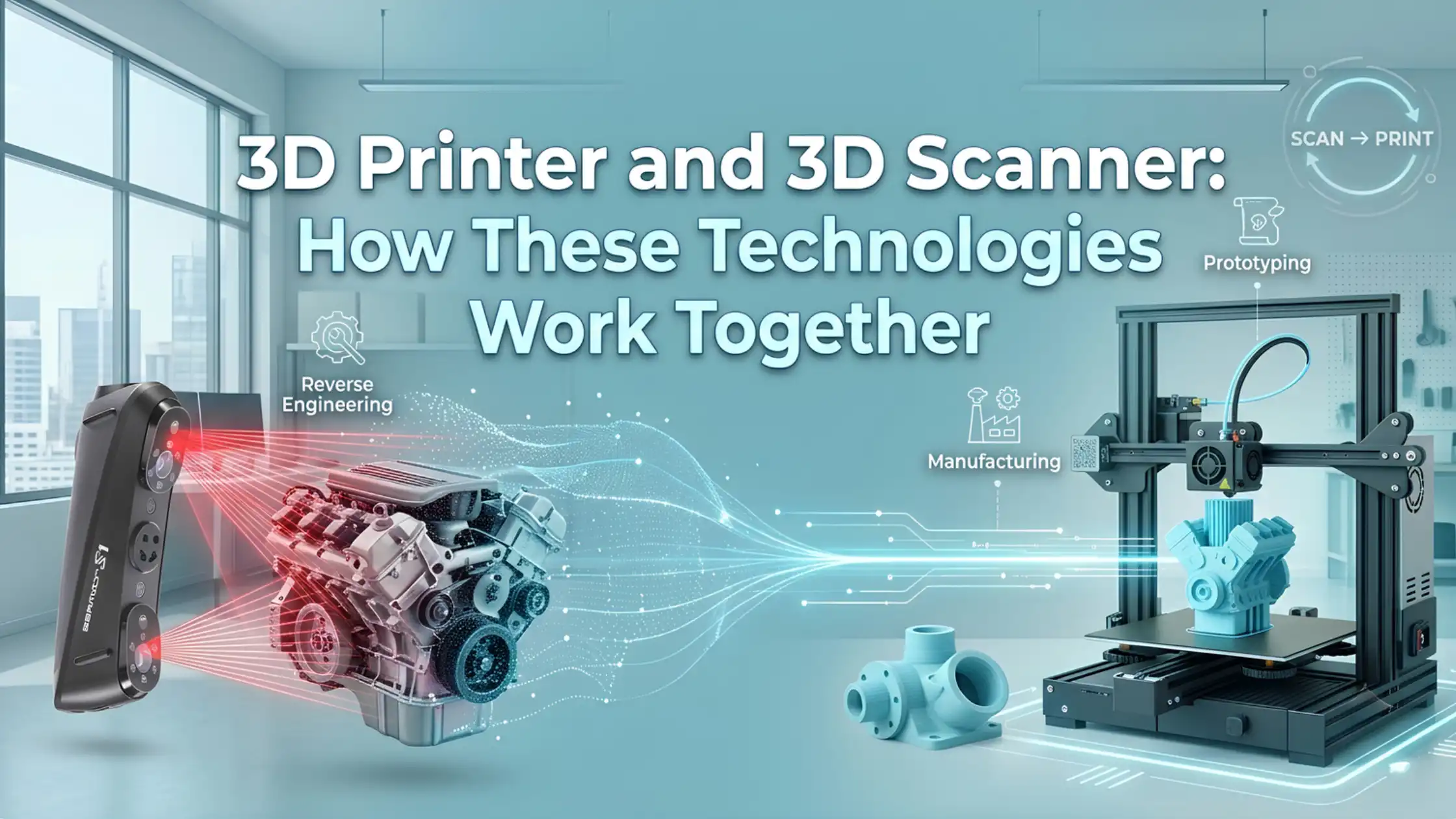
A 3D scanner and a 3D printer perform almost opposite jobs. A scanner captures a physical object's geometry and turns it into digital data, while a 3D printer takes digital information and turns it back into a physical part.
When you combine both technologies, however, they create a powerful workflow.
You can scan an existing component, process the captured data, modify the design and then manufacture a new version with a 3D printer. As a result, this combination can support reverse engineering, prototyping, replacement parts, product development, customisation and small-batch manufacturing.
In simple terms:
3D Scanner = Physical ? Digital
3D Printer = Digital ? Physical
Together, they create a complete scan-to-print workflow.
What Does a 3D Scanner Do?
A 3D scanner captures the shape and, depending on the scanner and scanning mode, surface information of a physical object.
Unlike a conventional camera, a 3D scanner records spatial information to create a digital representation of the object's geometry.
Handheld and portable scanners can use technologies such as laser scanning, structured light or infrared-based scanning. During the process, the scanner collects data from different areas of the object and combines that information into a point cloud or mesh.
However, a scan is not automatically a perfect CAD model.
The captured data may require alignment, mesh cleanup, hole filling or other processing before you can use it for design or manufacturing. For engineering applications, you may also need to reconstruct or modify the geometry in CAD software.
Therefore, scanner accuracy, object surface, tracking, scan coverage and post-processing all influence the final result.
What Does a 3D Printer Do?
A 3D printer performs the reverse part of the workflow.
Instead of capturing a physical object, it starts with a digital 3D model. For FDM printing, the model is usually imported into slicing software, where the software converts the geometry into printable layers and generates the required G-code.
The printer then heats the filament and deposits it layer by layer according to those instructions.
The basic process looks like this:
Digital Model ? Slicer ? G-code ? Filament ? Printed Part
Build volume, nozzle temperature, material compatibility, layer height, print speed and dimensional accuracy can all affect the final result.
Consequently, the quality of the digital model and the capability of the printer both matter.
How Do a 3D Scanner and 3D Printer Work Together?
The real advantage appears when you connect both workflows.
A typical process looks like this:
Start With a Physical Object:- You begin with an existing component, product, prototype or part that you want to reproduce or modify.
Scan the Object:- The 3D scanner captures the object's geometry and creates digital scan data.
Process the Scan:- The raw data may contain unwanted points, gaps or alignment issues. Therefore, you clean and process the scan to create a usable mesh.
Modify or Reverse-Engineer the Model:- Next, you can resize, repair or redesign the model. For engineering applications, you may reconstruct suitable CAD geometry from the scan.
Prepare the Model for Printing:- Once the design is ready, export it in a suitable format such as STL or 3MF and import it into slicing software.
3D Print the Part:- The FDM printer converts the digital model into a physical object layer by layer.
Inspect and Iterate:- Finally, inspect the printed part. If something needs improvement, modify the model and print it again.
This creates a useful cycle:
Scan ? Modify ? Print ? Inspect ? Improve
That iterative process makes 3D scanning and 3D printing particularly useful for development and engineering workflows.
The Complete 3D Scan-to-Print Workflow
The complete process can be visualised as:

Not every project requires every step.
For example, a simple decorative object might only need scanning, basic mesh cleanup and printing. On the other hand, a replacement component may require dimensional correction before printing.
Similarly, a reverse-engineering project may involve scan alignment, CAD reconstruction, design modification and multiple prototype iterations.
Therefore, the software and processing requirements depend heavily on the intended application.
Where Are 3D Scanning and 3D Printing Used Together?
The combination has applications across several industries and workflows.
Reverse Engineering:- You can capture an existing component and use the resulting digital geometry as a starting point for recreation or redesign. This becomes especially useful when original CAD files are unavailable.
Replacement Parts:- If a replacement component is difficult to source, scanning an existing part can provide a digital reference for creating a new version. However, the scan still needs to be checked for dimensional accuracy before manufacturing the replacement.
Product Development:- Design teams can scan existing products or physical prototypes and use the captured geometry as a reference for new designs. As a result, designers can move between physical testing and digital modification more efficiently.
Prototyping:- A physical prototype can be scanned, modified digitally and printed again. This makes it easier to test several design iterations without rebuilding every version from scratch.
Custom Parts:- Scanning can also help create components that need to fit around an existing object, surface or assembly.
Manufacturing and Inspection:- Manufacturers can use 3D scanning for digitisation, inspection, design verification and small-batch production workflows. The same scan-to-print approach can also help businesses preserve digital records of physical components for future reference.
What Happens Between Scanning and 3D Printing?
A common misconception is that a scanner simply produces a file that you can immediately send to a 3D printer.
In reality, there is usually a processing stage in between.
The workflow may involve:

It is also important to understand the difference between a mesh and CAD model.
A mesh represents the captured surface using many small polygons. CAD geometry, on the other hand, provides editable design geometry that is more suitable for precise engineering modifications.
Therefore, a simple model may only need mesh cleanup, while a reverse-engineering project may require additional CAD reconstruction.
What Should You Look for in a 3D Scanner and 3D Printer?
The right equipment depends on what you want to accomplish.
When Choosing a 3D Scanner
Consider:
Scanning accuracy
Resolution
Object size range
Tracking method
Scanning speed
Surface compatibility
Portability
Output formats
Software compatibility
For professional workflows, also consider how easily the scanner handles complex geometry, difficult surfaces and larger objects.
When Choosing an FDM 3D Printer
Consider:
Build volume
Dimensional accuracy
Material compatibility
Nozzle temperature
Print speed
Automation
Reliability
Enclosure or chamber requirements
Multi-material capability
Most importantly, match the printer to the type of parts you expect to produce from your scanned models.
3Idea 3D Scanners and Printers for Scan-to-Print Workflows
For users building a complete scan-to-print setup, 3Idea offers options across different scanning and FDM printing requirements.
For scanning, the lineup includes RaptorX, Sermoon S1, Raptor, Ferret SE and Otter Lite, covering different requirements from portable scanning to more demanding professional workflows.
For printing, options such as the Snapmaker U1, Bambu Lab X2D Combo, Bambu Lab P2S Combo and Anycubic Kobra X can complement scanned-model workflows with different combinations of speed, automation, multi-material capability and advanced FDM features.
Rather than choosing a scanner or printer based only on specifications, consider the complete workflow. For example, a reverse-engineering application may prioritise scanning accuracy and software capability, while a prototyping workflow may place greater importance on printer reliability, build volume and material compatibility.
Is a 3D Scanner and 3D Printer Combination Worth It?
A 3D scanner and 3D printer combination can be highly valuable when you regularly need to capture physical objects, modify designs, reproduce components, create prototypes or digitise existing parts.
It is particularly useful for engineering, product development, reverse engineering and small-batch manufacturing.
However, not everyone needs both technologies. If you only print existing digital models occasionally, a 3D printer may be enough.
The combination becomes more valuable when your workflow repeatedly moves between physical objects and digital designs.
Frequently Asked Questions
Q. Can a 3D scanner work with a 3D printer?
Ans:- Yes, scanned data can be processed into a printable model and then manufactured using a compatible 3D printer.
Q. Can you 3D print an object after scanning it?
Ans:- Yes, but the scan may require alignment, mesh cleanup, repairs or design modifications before printing.
Q. What is the 3D scan-to-print process?
Ans:- It generally involves scanning, processing the mesh, editing or reconstructing the model, slicing and 3D printing.
Q. Does a 3D scanner create an STL file?
Ans:- Many 3D scanners and their software support STL output, although available formats depend on the scanner and software.
Q. Do you need CAD software after 3D scanning?
Ans:- Not always; simple models may only need mesh processing, while reverse engineering often benefits from CAD software.
Q. What is 3D scanning used for in manufacturing?
Ans:- Common uses include reverse engineering, inspection, product development, digitisation, prototyping and replacement-part development.
Q. Can any 3D printer print a scanned model?
Ans:- The model must be suitable for the printer's build volume, technology, materials and slicing requirements.
Q. What is the difference between 3D scanning and 3D printing?
Ans:- 3D scanning converts a physical object into digital data, while 3D printing converts a digital model into a physical object.
Conclusion
A 3D printer and 3D scanner work best as complementary technologies. The scanner brings physical objects into the digital environment, while the printer turns digital designs back into physical parts.
When combined, they create a practical workflow for reverse engineering, prototyping, replacement parts, product development and small-batch manufacturing.
The key is to look beyond the individual machine and consider the complete process: scan accurately, process the data, modify the model where required, and print it with the right technology and material.
Explore 3D Scanners and 3D Printers at 3Idea
Explore our range of handheld and portable 3D scanners for scanning, reverse engineering, inspection and product development.
Explore our range of FDM 3D printers for prototyping, functional parts, custom components and small-batch production.
For specific scan-to-print applications, explore products such as RaptorX, Sermoon S1, Raptor, Ferret SE, Otter Lite, Snapmaker U1, Bambu Lab X2D Combo, Bambu Lab P2S Combo and Anycubic Kobra X.
Ready to optimize your setup? Explore our full collection of Printer and Scanners on 3Idea Web, or download the 3Idea app on Android and iOS to order on the go.